Ruby
Ruby
 Golang
 .Net
.Net
 MCP
MCP
 C++
C++

World Cup data constantly changes. Matches kick off, goals arrive, red cards shift momentum, some teams are eliminated, and the bracket moves on. Instead of refreshing the tournament scores page by hand, we can monitor it with simple API calls. The Google Sports API from SerpApi returns live structured data for all kinds of sport events including the World Cup. This way we can learn about games, teams, scores, kickoff times, venues, goal summaries, and more.
Getting live structured World Cup data
We can use live data from the new Google Sports API to answer many questions during the World Cup. We can track individual match scores as well all answer all kinds of other things during the tournament:
- How many matches are left in the tournament?
- How much time is left until the final?
- Which host nations are still alive?
- What were the biggest knockout-stage upsets so far?
- Which teams advanced despite red cards?
- Who scored the most recent brace?
- Who are the players on one's team?
This is because each of these questions maps to JSON fields returned by SerpApi's Google Sports API:
| Signal | API data we need |
|---|---|
| Scoreboard status | match status, scores, latest finished game, next upcoming game |
| Matches left | match status, round names, games list |
| Tournament time remaining | start_time for upcoming games, plus the bracket tab for the final |
| Host nations still alive | team names, winners, knockout progression |
| Knockout-stage upsets | scores, winners, round names |
| Teams advancing despite red cards | team-level win and red_card fields |
| Recent braces | goal_summary, scorers, goal counts, match time |
Let's go and have a closer look on how to run relevant queries for this kind of data.
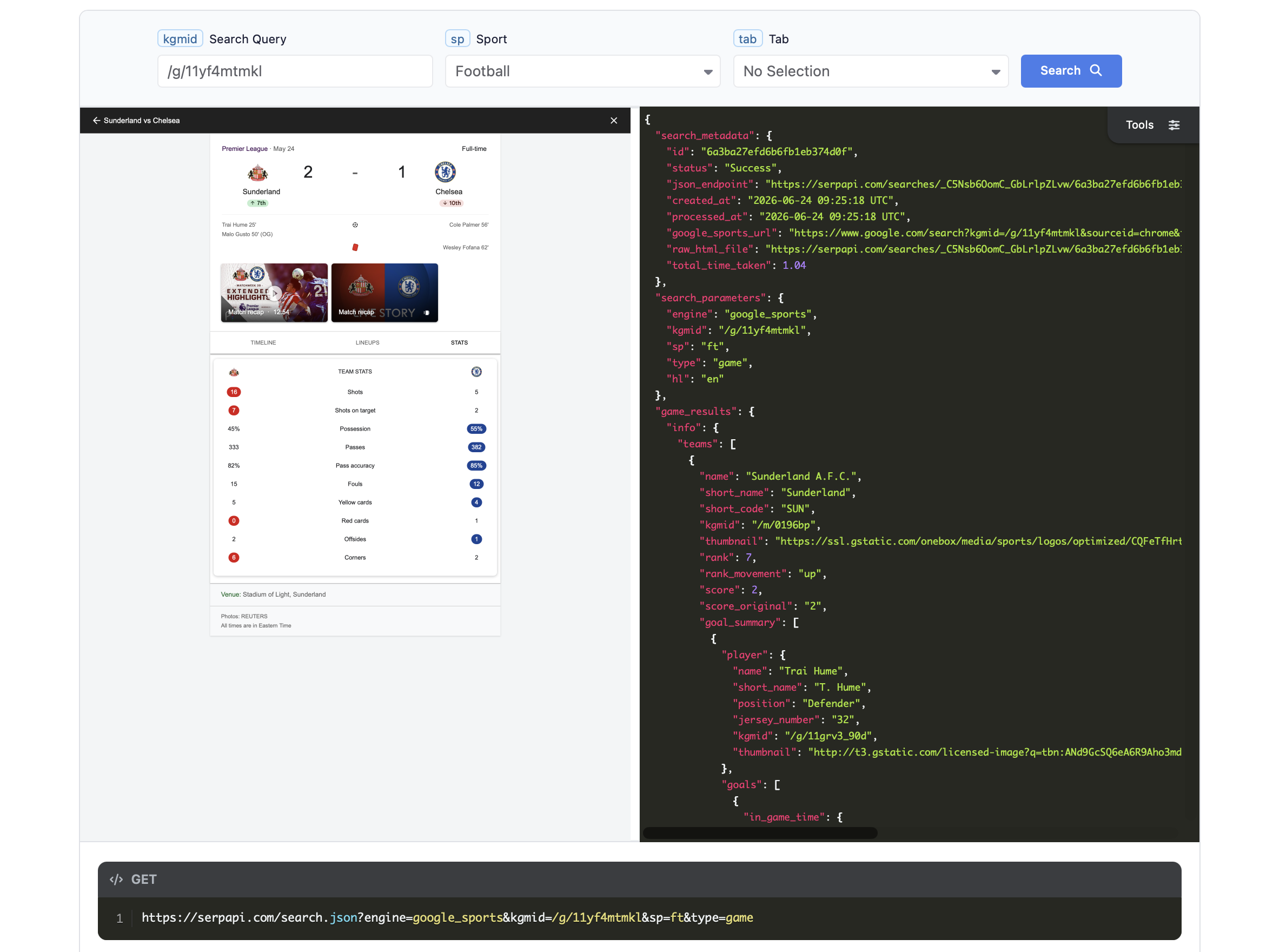
Using Google Sports API from SerpApi
SerpApi's Google Sports API retrieves structured data directly from Google Sports pages on every request. The only real requirement to use this API is to sign up for free. The API is quite simple with a single endpoint that needs to specify the google_sports engine:
GET https://serpapi.com/search.json?engine=google_sports
The important idea is that Google Sports data is organized around sports entities. In this post we use three of them:
- League: the FIFA World Cup as a tournament, useful for schedules, groups, brackets, and many games at once.
- Game: a single match, useful when we need more detail, such as goal summaries.
- Team: a national team, useful for team-specific games and player lists.
To get the tournament data, we start with the FIFA World Cup league entity:
GET https://serpapi.com/search.json
  ?engine=google_sports
  &kgmid=/m/030q7
  &sp=ft
  &type=league
  &tab=gm
  &hl=en
  &gl=us
  &api_key=YOUR_API_KEY
Here are the parameters we will use most often:
| Parameter | Meaning |
|---|---|
engine=google_sports |
Use SerpApi's Google Sports API |
kgmid=/m/030q7 |
Google Knowledge Graph ID for the FIFA World Cup |
sp=ft |
Football. The API also supports other sports, such as basketball (bs), baseball (bb), cricket (cr), American football (af), ice hockey (ih), and rugby (rg) |
type=league |
Query a league or tournament entity |
tab=gm |
Return the games tab |
tab=br |
Return the bracket tab, useful for the full knockout tree |
type=game |
Query a specific match by its game kgmid |
type=team |
Query a specific team by its team kgmid |
hl=en |
Return English results |
gl=us |
Use United States location context |
A shortened league response for an upcoming match looks like this:
{
  "league_results": {
    "game_groups": [
      {
        "title": "Quarter-finals",
        "games": [
          {
            "status": "upcoming",
            "start_time": "2026-07-09T20:00:00Z",
            "teams": [
              {
                "short_name": "France",
                "short_code": "FRA"
              },
              {
                "short_name": "Morocco",
                "short_code": "MAR"
              }
            ],
            "venue": {
              "name": "Boston Stadium",
              "location": "Foxborough"
            },
            "extensions": ["Quarter-finals"]
          }
        ]
      }
    ]
  }
}
A finished match includes scores and a winning team marker:
{
  "status": "finished",
  "status_original": "FT",
  "start_time": "2026-07-07T00:00:00Z",
  "teams": [
    {
      "name": "United States men's national soccer team",
      "short_code": "USA",
      "score": 1
    },
    {
      "short_name": "Belgium",
      "short_code": "BEL",
      "score": 4,
      "win": true
    }
  ],
  "extensions": ["Round of 16"]
}
SerpApi provides official clients for many languages including JavaScript, Python, Ruby, and PHP that makes integration easy. We'll use the JavaScript package with Node.js but feel free to use your favourite language.
Setting up a simple Node.js monitor
Every request for the google_sports engine follows the same pattern. We choose the sports entity type, pass its kgmid, and set the sport with sp. For this post on current World Cup, the defaults are:
{
  engine: "google_sports",
  kgmid: "/m/030q7",
  sp: "ft",
  type: "league",
  tab: "gm",
  hl: "en",
  gl: "us"
}
This means the following:
- use Google Sports
- fetch the FIFA World Cup entity
- treat it as football
- query it as a league
- and return the games tab
Using SerpApi's official JavaScript package, a minimal request looks like this:
const { getJson } = require("serpapi");

const data = await getJson({
  engine: "google_sports",
  kgmid: "/m/030q7",
  sp: "ft",
  type: "league",
  tab: "gm",
  hl: "en",
  gl: "us",
  api_key: process.env.SERPAPI_API_KEY
});
If you prefer not to use the package, the same request can be made as a regular GET request to https://serpapi.com/search.json.
The most important parameter to understand is type:
// Tournament-level data: games, bracket, standings, etc.
await getJson({
  engine: "google_sports",
  kgmid: "/m/030q7",
  sp: "ft",
  type: "league",
  tab: "gm",
  api_key: process.env.SERPAPI_API_KEY
});

// Single-match details, using a game kgmid from a previous response.
await getJson({
  engine: "google_sports",
  kgmid: "/g/11xmtfjhq2",
  sp: "ft",
  type: "game",
  api_key: process.env.SERPAPI_API_KEY
});

// Team-level data, using a team kgmid.
await getJson({
  engine: "google_sports",
  kgmid: "/m/0329gm",
  sp: "ft",
  type: "team",
  tab: "pl",
  api_key: process.env.SERPAPI_API_KEY
});
The tab parameter depends on the entity type:
| Entity type | Useful tabs | What we use it for |
|---|---|---|
league |
gm, br, sn |
Games, bracket, standings |
team |
gm, pl, sn |
Team games, players, standings |
game |
usually no tab for football | Match details such as teams, score, goals, and metadata |
For example, the World Cup games tab returns grouped games under league_results.game_groups. To work with those games, we usually flatten the groups first:
function getGames(data) {
  const groups = data.league_results?.game_groups || [];

  return groups.flatMap((group) =>
    (group.games || []).map((game) => ({
      ...game,
      group_title: group.title
    }))
  );
}
From there, each game object has the fields we need for most monitoring tasks: status, start_time, teams, venue, extensions, and often kgmid for fetching more detailed game data later.
One small cleanup helper is also useful. Some teams include short_name, while others only include a longer official name, such as "United States men's national soccer team". For display output, we can normalize that:
function teamName(team) {
  const name = team.short_name || team.name || team.short_code || "TBD";

  return name.replace(/\s+(?:men's\s+)?national\s+(?:football|soccer)\s+team$/i, "");
}
With those pieces in place, we can start building monitors answering questions we want from the JSON response.
Monitoring FIFA World Cup 2026
We'll use SerpApi's new Google Sports API to build a few small Node.js scripts for answering practical, real-time questions like What are the current scores?, How many matches are left?, Which host nations are still alive?, Who scored a brace?, and Which knockout results stand out?.
What's the current scoreboard?
The most important thing we need to start with is the scoreboard. The following code will give you a quick summary for the World Cup and list of some latest finished games. Here's a full code that builds on top of the API call we discussed in the previous section but also filters through the relevant information:
#!/usr/bin/env node

const { getJson } = require("serpapi");

const WORLD_CUP_KGMID = "/m/030q7";

function getApiKey() {
  const apiKey = process.env.SERPAPI_API_KEY;

  if (!apiKey) {
    throw new Error("Missing SERPAPI_API_KEY. Set it with: export SERPAPI_API_KEY=your_key");
  }

  return apiKey;
}

async function serpapiSearch(params = {}) {
  const searchParams = Object.fromEntries(
    Object.entries({
      engine: "google_sports",
      kgmid: WORLD_CUP_KGMID,
      sp: "ft",
      type: "league",
      tab: "gm",
      hl: "en",
      gl: "us",
      api_key: getApiKey(),
      ...params
    }).filter(([, value]) => value !== undefined && value !== null)
  );

  const data = await getJson(searchParams);

  if (data.error) {
    throw new Error(`SerpApi error: ${data.error}`);
  }

  return data;
}

function getGames(data) {
  const groups = data.league_results?.game_groups || [];

  return groups.flatMap((group) =>
    (group.games || []).map((game) => ({
      ...game,
      group_title: group.title
    }))
  );
}

function teamName(team) {
  const name = team.short_name || team.name || team.short_code || "TBD";

  return name.replace(/\s+(?:men's\s+)?national\s+(?:football|soccer)\s+team$/i, "");
}

function scoreLine(game) {
  const teams = game.teams || [];

  return teams
    .map((team) => {
      const score = team.score_original ?? team.score;
      return score === undefined ? teamName(team) : `${teamName(team)} ${score}`;
    })
    .join(" - ");
}

function roundLabel(game) {
  const extension = (game.extensions || []).find((item) =>
    /Group Stage|Round of 32|Round of 16|Quarter-finals|Semi-finals|Third place play-off|Final/.test(item)
  );

  return extension || game.group_title || "Unknown round";
}

function formatUtc(isoString) {
  if (!isoString) return "unknown time";

  return `${isoString.replace("T", " ").replace("Z", "")} UTC`;
}

function summarizeStatuses(games) {
  const counts = new Map();

  for (const game of games) {
    counts.set(game.status, (counts.get(game.status) || 0) + 1);
  }

  return counts;
}

function printGames(title, games) {
  console.log(`\n${title}`);
  console.log("-".repeat(title.length));

  if (games.length === 0) {
    console.log("No games found.");
    return;
  }

  for (const game of games) {
    console.log(`- ${roundLabel(game)} — ${scoreLine(game)} — ${game.status} — ${formatUtc(game.start_time)}`);
  }
}

async function main() {
  const data = await serpapiSearch({ tab: "gm" });
  const games = getGames(data).sort(
    (a, b) => new Date(a.start_time || 0) - new Date(b.start_time || 0)
  );

  const finished = games.filter((game) => game.status === "finished");
  const liveOrOther = games.filter((game) => !["finished", "upcoming"].includes(game.status));
  console.log("World Cup score monitor");
  console.log(`Fetched ${games.length} games from SerpApi Google Sports API.`);

  console.log("\nStatus summary");
  console.log("--------------");
  for (const [status, count] of summarizeStatuses(games)) {
    console.log(`- ${status}: ${count}`);
  }

  printGames("Live or in-progress matches", liveOrOther);
  printGames("Latest finished scores", finished.slice(-8));
}

main().catch((error) => {
  console.error(error.message);
  process.exit(1);
});
It looks long but most of the code are just helpers for formatting the information.
To run it, saved it as a file, and type:
node score-monitor.js
You should get a similar results back, giving you a quick glance on the whole live tournament:
World Cup score monitor
Fetched 40 games from SerpApi Google Sports API.

Status summary
--------------
- finished: 32
- upcoming: 8

Live or in-progress matches
---------------------------
No games found.

Latest finished scores
----------------------
- Round of 16 — Canada 0 - Morocco 3 — finished — 2026-07-04 17:00:00 UTC
- Round of 16 — Paraguay 0 - France 1 — finished — 2026-07-04 21:00:00 UTC
- Round of 16 — Brazil 1 - Norway 2 — finished — 2026-07-05 20:00:00 UTC
- Round of 16 — Mexico 2 - England 3 — finished — 2026-07-06 01:00:00 UTC
- Round of 16 — Portugal 0 - Spain 1 — finished — 2026-07-06 19:00:00 UTC
- Round of 16 — United States 1 - Belgium 4 — finished — 2026-07-07 00:00:00 UTC
- Round of 16 — Argentina 3 - Egypt 2 — finished — 2026-07-07 16:00:00 UTC
- Round of 16 — Switzerland 0 (4) - Colombia 0 (3) — finished — 2026-07-07 20:00:00 UTC
This way we can build nice dashboards, especially if we would later format the data into HTML.
How many matches are left?
We already printed how many games are left, but we don't know which matches will take place. For that we can define a few additional functions:
const KNOCKOUT_ROUND_PATTERN = /Round of 32|Round of 16|Quarter-finals|Semi-finals|Third place play-off|Final/;

function getBracketGames(data) {
  const brackets = data.league_results?.brackets || [];

  return brackets.flatMap((bracket) =>
    (bracket.stages || []).flatMap((stage) =>
      (stage.games || []).map((game) => ({
        ...game,
        group_title: stage.title
      }))
    )
  );
}

function matchup(game) {
  const teams = game.teams || [];

  if (teams.length === 0) return "teams to be determined";

  return teams.map(teamName).join(" vs ");
}

function roundLabel(game) {
  const extension = (game.extensions || []).find((item) => KNOCKOUT_ROUND_PATTERN.test(item));

  return extension || game.group_title || "Unknown round";
}

async function main() {
  const data = await serpapiSearch({ tab: "gm" });
  const games = getGames(data);
  let upcomingGames = games
    .filter((game) => game.status === "upcoming")
    .sort((a, b) => new Date(a.start_time) - new Date(b.start_time));

  // The games tab returns a rolling window of relevant games, which may not
  // reach the Final. The bracket tab always covers the full knockout tree.
  let usedBracket = false;

  if (!upcomingGames.some((game) => roundLabel(game) === "Final")) {
    const bracketData = await serpapiSearch({ tab: "br" });
    const knownKgmids = new Set(upcomingGames.map((game) => game.kgmid));
    const missingGames = getBracketGames(bracketData).filter(
      (game) => game.status === "upcoming" && !knownKgmids.has(game.kgmid)
    );

    if (missingGames.length > 0) {
      usedBracket = true;
      upcomingGames = upcomingGames
        .concat(missingGames)
        .sort((a, b) => new Date(a.start_time) - new Date(b.start_time));
    }
  }

  const breakdown = new Map();

  for (const game of upcomingGames) {
    const round = roundLabel(game);
    breakdown.set(round, (breakdown.get(round) || 0) + 1);
  }

  console.log(`Matches left: ${upcomingGames.length}`);

  if (usedBracket) {
    console.log("(games tab window did not include the Final; completed from the bracket tab)");
  }

  console.log("\nBreakdown by round:");

  for (const [round, count] of breakdown) {
    console.log(`- ${round}: ${count}`);
  }

  console.log("\nUpcoming matches:");

  for (const game of upcomingGames) {
    console.log(`- ${formatUtc(game.start_time)} — ${roundLabel(game)} — ${matchup(game)}`);
  }

  const thirdPlaceGames = upcomingGames.filter((game) => roundLabel(game) === "Third place play-off");
  const championPathCount = upcomingGames.length - thirdPlaceGames.length;

  console.log(`\nMatches on the path to crowning the champion: ${championPathCount}`);
}
There is one practical detail to handle. The games tab returns a rolling window of currently relevant games. In this run the window covered everything up to the Final, but a day earlier it ended at the third-place play-off. The bracket tab (tab=br) always covers the full knockout tree, so the script completes the list from there whenever the Final is missing:
if (!upcomingGames.some((game) => roundLabel(game) === "Final")) {
  const bracketData = await serpapiSearch({ tab: "br" });
  const knownKgmids = new Set(upcomingGames.map((game) => game.kgmid));

  const missingGames = getBracketGames(bracketData).filter(
    (game) => game.status === "upcoming" && !knownKgmids.has(game.kgmid)
  );

  upcomingGames = upcomingGames.concat(missingGames);
}
Save the new code and run it:
node matches-left.js
Note that I haven't repeated the same functions from before. You can, however, run the full script from GitHub.
And here's the output:
Matches left: 8

Breakdown by round:
- Quarter-finals: 4
- Semi-finals: 2
- Third place play-off: 1
- Final: 1

Upcoming matches:
- 2026-07-09 20:00:00 UTC — Quarter-finals — France vs Morocco
- 2026-07-10 19:00:00 UTC — Quarter-finals — Spain vs Belgium
- 2026-07-11 21:00:00 UTC — Quarter-finals — Norway vs England
- 2026-07-12 01:00:00 UTC — Quarter-finals — Argentina vs Switzerland
- 2026-07-14 19:00:00 UTC — Semi-finals — teams to be determined
- 2026-07-15 19:00:00 UTC — Semi-finals — teams to be determined
- 2026-07-18 21:00:00 UTC — Third place play-off — teams to be determined
- 2026-07-19 19:00:00 UTC — Final — teams to be determined

Matches on the path to crowning the champion: 7
How much time is left in the tournament?
If we are interested how far are we in the tournament in terms the total time left, we can define a function for the duration and try to calculate it:
function pluralize(count, singular, plural = `${singular}s`) {
  return `${count} ${count === 1 ? singular : plural}`;
}

function formatDuration(milliseconds) {
  const totalHours = Math.floor(milliseconds / 1000 / 60 / 60);
  const days = Math.floor(totalHours / 24);
  const hours = totalHours % 24;

  return `${pluralize(days, "day")} and ${pluralize(hours, "hour")}`;
}

async function main() {
  const data = await serpapiSearch({ tab: "gm" });
  const games = getGames(data);
  const upcomingGames = games
    .filter((game) => game.status === "upcoming" && game.start_time)
    .sort((a, b) => new Date(a.start_time) - new Date(b.start_time));

  if (upcomingGames.length === 0) {
    console.log("No upcoming matches found.");
    return;
  }

  const nextMatch = upcomingGames[0];
  let final = upcomingGames.find((game) => roundLabel(game) === "Final");

  // Fall back to the bracket tab when the games window ends before the Final.
  if (!final) {
    const bracketData = await serpapiSearch({ tab: "br" });
    final = getBracketGames(bracketData).find(
      (game) => roundLabel(game) === "Final" && game.status === "upcoming" && game.start_time
    );
  }

  console.log(`Next match: ${matchup(nextMatch)}`);
  console.log(`Next kickoff: ${formatUtc(nextMatch.start_time)}`);

  if (final) {
    const untilFinal = new Date(final.start_time) - Date.now();
    const span = new Date(final.start_time) - new Date(nextMatch.start_time);

    console.log(`Final kickoff: ${formatUtc(final.start_time)}`);
    console.log(`Time left until the final kicks off: ${formatDuration(untilFinal)}`);
    console.log(`Calendar span from next kickoff to final kickoff: ${formatDuration(span)}`);
  } else {
    console.log("Final kickoff: not found in the games or bracket responses");
  }

  const regulationMinutes = upcomingGames.length * 90;
  const withHalftimeMinutes = regulationMinutes + upcomingGames.length * 15;

  console.log("\nEstimated watching time for the remaining matches:");
  console.log(`- Regulation only: ${regulationMinutes} minutes (${(regulationMinutes / 60).toFixed(1)} hours)`);
  console.log(`- With halftime: ${withHalftimeMinutes} minutes (${(withHalftimeMinutes / 60).toFixed(1)} hours)`);
  console.log("- With stoppage time, extra time, and penalties: add more time depending on match events");
}
The same response includes start_time for upcoming games. We sort upcoming matches by kickoff time and look for the Final. We fall back to the bracket tab if the games window ends before it:
const upcomingGames = games
  .filter((game) => game.status === "upcoming" && game.start_time)
  .sort((a, b) => new Date(a.start_time) - new Date(b.start_time));

const nextMatch = upcomingGames[0];
let final = upcomingGames.find((game) => roundLabel(game) === "Final");

if (!final) {
  const bracketData = await serpapiSearch({ tab: "br" });
  final = getBracketGames(bracketData).find(
    (game) => roundLabel(game) === "Final" && game.status === "upcoming"
  );
}
To run it, save it as a file, and type:
node time-left.js
And here's the output:
Next match: France vs Morocco
Next kickoff: 2026-07-09 20:00:00 UTC
Final kickoff: 2026-07-19 19:00:00 UTC
Time left until the final kicks off: 10 days and 9 hours
Calendar span from next kickoff to final kickoff: 9 days and 23 hours

Estimated watching time for the remaining matches:
- Regulation only: 720 minutes (12.0 hours)
- With halftime: 840 minutes (14.0 hours)
- With stoppage time, extra time, and penalties: add more time depending on match events
So the tournament wraps up with the Final at New York New Jersey Stadium on July 19, and a fan committed to every remaining match is looking at roughly 14 hours of football.
Which host nations are still alive?
It's often said that host nations have the advantage of local fans. If we want to track the results of host nation teams we could filter them based on their codes like in this following example:
const HOST_CODES = ["CAN", "MEX", "USA"];

function scoreLine(game) {
  const teams = game.teams || [];

  return teams
    .map((team) => {
      const score = team.score_original ?? team.score;
      return score === undefined ? teamName(team) : `${teamName(team)} ${score}`;
    })
    .join(" - ");
}

function roundLabel(game) {
  const extension = (game.extensions || []).find((item) => KNOCKOUT_ROUND_PATTERN.test(item));

  return extension || game.group_title || "Unknown round";
}

function isKnockout(game) {
  return KNOCKOUT_ROUND_PATTERN.test(
    `${game.group_title || ""} ${(game.extensions || []).join(" ")}`
  );
}

function hostStatus(games, hostCode) {
  const hostGames = games
    .filter((game) => (game.teams || []).some((team) => team.short_code === hostCode))
    .sort((a, b) => new Date(a.start_time || 0) - new Date(b.start_time || 0));

  if (hostGames.length === 0) {
    return "not present in the current games window";
  }

  for (const game of hostGames) {
    if (game.status !== "finished" || !isKnockout(game)) continue;

    const host = (game.teams || []).find((team) => team.short_code === hostCode);
    const winner = (game.teams || []).find((team) => team.win);

    if (winner && host && !host.win) {
      return `eliminated by ${teamName(winner)} — ${scoreLine(game)} (${roundLabel(game)})`;
    }
  }

  const nextGame = hostGames.find((game) => game.status === "upcoming");

  if (nextGame) {
    return `still alive — next match: ${roundLabel(nextGame)}`;
  }

  return "still alive";
}

async function main() {
  const data = await serpapiSearch({ tab: "gm" });
  const games = getGames(data);

  console.log("Host nation status:\n");

  for (const hostCode of HOST_CODES) {
    const hostGame = games.find((game) =>
      (game.teams || []).some((team) => team.short_code === hostCode)
    );
    const hostTeam = (hostGame?.teams || []).find((team) => team.short_code === hostCode);
    const name = hostTeam ? teamName(hostTeam) : hostCode;

    console.log(`- ${name}: ${hostStatus(games, hostCode)}`);
  }
}
For this tournament, the host nations are:
- Canada
- Mexico
- United States
To monitor their status, we can inspect knockout-stage games involving those teams and check whether they won or were eliminated.
const hostCodes = new Set(["CAN", "MEX", "USA"]);

const hostKnockoutGames = games.filter((game) => {
  const hasHost = (game.teams || []).some((team) => hostCodes.has(team.short_code));

  return isKnockout(game) && hasHost;
});
The isKnockout helper matches the round name against the knockout rounds (Round of 32 through Final) found in each game's extensions.
Again, I have shorten it to not repeat previous functions. Save and run as:
node host-nations.js
And here's the output:
Host nation status:

- Canada: eliminated by Morocco — Canada 0 - Morocco 3 (Round of 16)
- Mexico: eliminated by England — Mexico 2 - England 3 (Round of 16)
- United States: eliminated by Belgium — United States 1 - Belgium 4 (Round of 16)
So the answer for the current 2026 World Cup is straightforward:
None. All three host nations were eliminated before the quarter-finals.
What were the biggest knockout-stage upsets so far?
The next question is a fun one. We want to find out when a heavily favored team is defeated by a significantly weaker opponent (the "underdog").
// Editorial choice: traditional favorites losing to anyone outside this list
// counts as a possible upset.
const FAVORITES = new Set(["BRA", "ARG", "FRA", "ESP", "ENG", "GER", "POR"]);

(...)

async function main() {
  const data = await serpapiSearch({ tab: "gm" });
  const games = getGames(data);
  const knockoutGames = games.filter(
    (game) => isKnockout(game) && game.status === "finished"
  );

  const possibleUpsets = knockoutGames.filter((game) => {
    const teams = game.teams || [];
    const winner = teams.find((team) => team.win);
    const loser = teams.find((team) => !team.win);

    return (
      winner &&
      loser &&
      FAVORITES.has(loser.short_code) &&
      !FAVORITES.has(winner.short_code)
    );
  });

  console.log("Possible knockout-stage upsets:\n");

  if (possibleUpsets.length === 0) {
    console.log("No upsets found by this definition.");
    return;
  }

  for (const game of possibleUpsets) {
    const winner = (game.teams || []).find((team) => team.win);
    const loser = (game.teams || []).find((team) => !team.win);

    console.log(
      `- ${teamName(winner)} beat ${teamName(loser)} — ${scoreLine(game)} (${roundLabel(game)})`
    );
  }
}
This monitor is a little more interpretive. We then add our own definition of what counts as an upset. One simple approach to find them is to keep a list of traditional favorite teams and see where one of them loses to a team outside that list:
const favorites = new Set(["BRA", "ARG", "FRA", "ESP", "ENG", "GER", "POR"]);

const possibleUpsets = knockoutGames.filter((game) => {
  const teams = game.teams || [];
  const winner = teams.find((team) => team.win);
  const loser = teams.find((team) => !team.win);

  return winner && loser && favorites.has(loser.short_code) && !favorites.has(winner.short_code);
});
We can again save this and run as:
node upsets.js
And here's a possible output:
Possible knockout-stage upsets:

- Paraguay beat Germany — Germany 1 (3) - Paraguay 1 (4) (Round of 32)
- Norway beat Brazil — Brazil 1 - Norway 2 (Round of 16)
Finding out these upsets might be a little bit personal, but hopefully you don't mind the logic here.
Which teams ended up with red cards?
Red cards mean the opposite of fair play. If you want to know which teams ended up with a red card during their games, you can ask on team.read_card:
function hasRedCard(game) {
  return (game.teams || []).some((team) => team.red_card);
}

function gameKey(game) {
  return game.kgmid || `${game.start_time || "unknown"}|${matchup(game)}|${roundLabel(game)}`;
}

function mergeGames(games) {
  const gamesByKey = new Map();

  for (const game of games) {
    const key = gameKey(game);
    const existing = gamesByKey.get(key);

    if (!existing || (!hasRedCard(existing) && hasRedCard(game))) {
      gamesByKey.set(key, game);
    }
  }

  return [...gamesByKey.values()].sort(
    (a, b) => new Date(a.start_time || 0) - new Date(b.start_time || 0)
  );
}

async function main() {
  const [gamesData, bracketData] = await Promise.all([
    serpapiSearch({ tab: "gm" }),
    serpapiSearch({ tab: "br" })
  ]);
  const games = mergeGames([
    ...getGames(gamesData),
    ...getBracketGames(bracketData)
  ]);

  const redCards = games.flatMap((game) =>
    (game.teams || [])
      .filter((team) => team.red_card)
      .map((team) => ({ team, game }))
  );

  console.log("Red cards in the tournament:\n");

  if (redCards.length === 0) {
    console.log("No red cards found in the returned tournament data.");
    return;
  }

  for (const { team, game } of redCards) {
    console.log(
      `- ${teamName(team)} — ${roundLabel(game)} — ${scoreLine(game)} — ${matchup(game)} — ${formatUtc(game.start_time)}`
    );
  }

  console.log(`\nTotal red-card team entries: ${redCards.length}`);
}
Save and run as:
node red-cards.js
And here's the output:
Red cards in the tournament:

- Ecuador — Round of 32 — Mexico 2 - Ecuador 0 — Mexico vs Ecuador — 2026-07-01 02:00:00 UTC
- United States — Round of 32 — United States 2 - Bosnia and Herzegovina 0 — United States vs Bosnia and Herzegovina — 2026-07-02 00:00:00 UTC
- England — Round of 16 — Mexico 2 - England 3 — Mexico vs England — 2026-07-06 01:00:00 UTC

Total red-card team entries: 3
Looks like there were 3 red cards so far.
Who scored the most recent brace?
You might know hat-tricks. They are amazing but not that common. There is also a term that sits below it. Braces are where a single player scores two goals in a single match. Using the structured data from the Google Sports API, we can try to find the last player who successfully scored a brace:
async function fetchGameDetails(game) {
  if (!game.kgmid) return game;

  const data = await serpapiSearch({
    kgmid: game.kgmid,
    type: "game",
    tab: undefined
  });

  return {
    ...game,
    ...(data.game_results?.info || {})
  };
}

function formatGoalMinute(goal) {
  const time = goal.in_game_time || {};
  const minute = time.minute;
  const stoppage = time.stoppage_minute;

  if (minute === undefined) return "unknown minute";
  if (stoppage !== undefined) return `${minute}+${stoppage}'`;

  return `${minute}'`;
}

function findBracesInGame(game) {
  const braces = [];

  for (const team of game.teams || []) {
    for (const summary of team.goal_summary || []) {
      const goals = summary.goals || [];

      if (goals.length >= 2) {
        const opponents = (game.teams || []).filter((otherTeam) => otherTeam !== team);

        braces.push({
          player: summary.player?.name || summary.player?.short_name || "Unknown player",
          team,
          goals,
          opponents,
          game
        });
      }
    }
  }

  return braces;
}

async function fetchGameDetails(game) {
  if (!game.kgmid) return game;

  const data = await serpapiSearch({
    kgmid: game.kgmid,
    type: "game",
    tab: undefined
  });

  return {
    ...game,
    ...(data.game_results?.info || {})
  };
}

async function main() {
  const data = await serpapiSearch({ tab: "gm" });
  const games = getGames(data);
  const finishedGames = games
    .filter((item) => item.status === "finished")
    .sort((a, b) => new Date(b.end_time || b.start_time || 0) - new Date(a.end_time || a.start_time || 0));

  let mostRecentBrace;

  for (const game of finishedGames) {
    const detailedGame = findBracesInGame(game).length > 0 ? game : await fetchGameDetails(game);
    const braces = findBracesInGame(detailedGame);

    if (braces.length > 0) {
      mostRecentBrace = braces[0];
      break;
    }
  }

  if (!mostRecentBrace) {
    console.log("No braces found in the returned API data.");
    return;
  }

  const { player, team, goals, opponents, game } = mostRecentBrace;
  const goalMinutes = goals.map(formatGoalMinute).join(", ");

  console.log("Most recent brace found:\n");
  console.log(`Player: ${player}`);
  console.log(`Team: ${teamName(team)}`);
  console.log(`Opponent: ${opponents.map(teamName).join(", ")}`);
  console.log(`Match: ${matchup(game)}`);
  console.log(`Score: ${scoreLine(game)}`);
  console.log(`Round: ${roundLabel(game)}`);
  console.log(`Match time: ${formatUtc(game.start_time)}`);
  console.log(`Goal minutes: ${goalMinutes}`);
}
For this signal, we need game-level goal data. The league games response usually does not include goal_summary, so the script fetches game details for recent finished games via the game entity type. Passing tab: undefined removes the league-level tab=gm default from the shared helper, since game entities have no tabs:
const data = await serpapiSearch({
  kgmid: game.kgmid,
  type: "game",
  tab: undefined
});

const detailedGame = {
  ...game,
  ...(data.game_results?.info || {})
};
The detailed response includes a goal_summary per team:
{
  "player": {
    "name": "Charles De Ketelaere",
    "position": "Striker",
    "jersey_number": "17"
  },
  "goals": [
    { "in_game_time": { "minute": 9 } },
    { "in_game_time": { "minute": 33 } }
  ]
}
The function findBracesInGame is currently looking for 2 or more goals, so it will also find hat-tricks (3x), hauls (4x), and double hat-tricks (5x).
Save and run as:
node most-recent-brace.js
And see the output:
Most recent brace found:

Player: Charles De Ketelaere
Team: Belgium
Opponent: United States
Match: United States vs Belgium
Score: United States 1 - Belgium 4
Round: Round of 16
Match time: 2026-07-07 00:00:00 UTC
Goal minutes: 9', 33'
We found Charles De Ketelaere from Belgium who scored twice in the game against the United States.
What is the team journey in the tournament?
Finally, let's find out more about the teams themselves. The SerpApi's new Google Sports API supports type=team, so we can fetch team-specific data with the team's kgmid as well. There are plenty of things we might be interested in. Let's look at World Cup games in the current league, the last match, and the team structure:
const TEAM = {
  code: process.env.TEAM_CODE || "BEL",
  kgmid: process.env.TEAM_KGMID || "/m/0329gm",
  fallbackName: process.env.TEAM_NAME || "Belgium"
};

async function main() {
  const [leagueData, playersData] = await Promise.all([
    serpapiSearch({ tab: "gm" }),
    serpapiSearch({ kgmid: TEAM.kgmid, type: "team", tab: "pl" })
  ]);

  const games = getGames(leagueData);
  const teamGames = games
    .filter((game) => findTeamInGame(game))
    .sort((a, b) => new Date(a.start_time || 0) - new Date(b.start_time || 0));

  const players = playersData.team_results?.players || [];
  const inferredTeam = teamGames.map(findTeamInGame).find(Boolean);
  const displayName = inferredTeam ? teamName(inferredTeam) : TEAM.fallbackName;
  const nextGame = teamGames.find((game) => game.status === "upcoming");
  const latestFinished = [...teamGames].reverse().find((game) => game.status === "finished");

  console.log(`Team monitor: ${displayName}`);
  console.log(`Team code: ${TEAM.code}`);
  console.log(`Team kgmid: ${TEAM.kgmid}`);

  console.log("\nWorld Cup games in the current league response:");
  if (teamGames.length === 0) {
    console.log("- No games found for this team in the current league response.");
  } else {
    for (const game of teamGames) {
      const label = game.status === "upcoming" ? matchup(game) : scoreLine(game);
      console.log(`- ${roundLabel(game)} — ${label} — ${game.status} — ${formatUtc(game.start_time)}`);
    }
  }

  if (latestFinished) {
    console.log(`\nLatest finished World Cup match: ${scoreLine(latestFinished)} (${roundLabel(latestFinished)})`);
  }

  if (nextGame) {
    console.log(`Next World Cup match: ${matchup(nextGame)} (${roundLabel(nextGame)}) at ${formatUtc(nextGame.start_time)}`);
  }

  console.log("\nTeam players from Google Sports team endpoint:");
  console.log(`Players returned: ${players.length}`);

  for (const [position, count] of positionBreakdown(players)) {
    console.log(`- ${position}: ${count}`);
  }

  console.log("\nSample players:");
  for (const player of players.slice(0, 10)) {
    console.log(`- ${player.name}${player.position ? ` — ${player.position}` : ""}`);
  }
}
The example defaults to Belgium because Belgium is still alive in the current response (at the time of the writing) and even has a recent match with detailed goal data:
const playersData = await serpapiSearch({
  kgmid: "/m/0329gm",
  type: "team",
  tab: "pl"
});

const players = playersData.team_results?.players || [];
The script also reuses the World Cup league response to list Belgium's World Cup games in the current tournament window.
Save and run as usual:
node team-info.js
And here's the output for the provided Belgian team:
Team monitor: Belgium
Team code: BEL
Team kgmid: /m/0329gm

World Cup games in the current league response:
- Group Stage · Fri, Jun 26 — New Zealand 1 - Belgium 5 — finished — 2026-06-27 03:00:00 UTC
- Round of 32 — Belgium 3 - Senegal 2 — finished — 2026-07-01 20:00:00 UTC
- Round of 16 — United States 1 - Belgium 4 — finished — 2026-07-07 00:00:00 UTC
- Quarter-finals — Spain vs Belgium — upcoming — 2026-07-10 19:00:00 UTC

Latest finished World Cup match: United States 1 - Belgium 4 (Round of 16)
Next World Cup match: Spain vs Belgium (Quarter-finals) at 2026-07-10 19:00:00 UTC

Team players from Google Sports team endpoint:
Players returned: 26
- Defender: 9
- Forward: 7
- Goalkeeper: 3
- Midfielder: 7

Sample players:
- Jérémy Doku — Forward
- Kevin De Bruyne — Midfielder
- Romelu Lukaku — Forward
- Youri Tielemans — Midfielder
- Thibaut Courtois — Goalkeeper
- Senne Lammens — Goalkeeper
- Leandro Trossard — Forward
- Charles De Ketelaere — Forward
- Axel Witsel — Midfielder
- Amadou Onana — Midfielder
This is a useful complement to score monitoring. Once a team appears in the next fixture or a standout result, we can fetch its player list and recent team context with the same API. You can of course point the same script at another team by passing a different team code and kgmid.
Google Sports API examples
You can find all these World Cup API examples on our GitHub page. Checkout the repository and provide a SerpApi API key to run them individually with Node:
export SERPAPI_API_KEY=your_serpapi_api_key

node google-sports-api-world-cup/00-score-monitor.js
node google-sports-api-world-cup/01-matches-left.js
node google-sports-api-world-cup/02-time-left.js
node google-sports-api-world-cup/03-host-nations.js
node google-sports-api-world-cup/04-upsets.js
node google-sports-api-world-cup/05-red-cards.js
node google-sports-api-world-cup/06-most-recent-brace.js
node google-sports-api-world-cup/07-team-info.js
If you want SerpApi to fetch fresh results instead of using a cached response, set:
export SERPAPI_NO_CACHE=true
Wrapping up
SerpApi's Google Sports API is useful not only for keeping an eye on World Cup scores, but also for monitoring other parts of the tournament. With a few small scripts fetching the structured data live, we can track match status, remaining games, host nation eliminations, red cards, and more.
All of that makes the API a good fit for live dashboards, alerts, editorial tools, sports newsletters, and lightweight automation around major tournaments. See the Google Sports API documentation for yourself and have a look at How to scrape Google sports results for even more sport scraping options.