Ruby
Ruby
 Golang
 .Net
.Net
 MCP
MCP
 C++
C++

Google Search can provide detailed information about past sports matches, ongoing games, teams, players, scheduled events, leagues, and tournaments. For individual games, that information can include the score, team rosters, statistics like passes and possession, location, and other facts. Google also provides the same data through its Gemini chatbot and Google Assistant.
The Google Sports Results API from SerpApi provides all that data in simple JSON format, ready for any programming language or automation. SerpApi handles the web scraping, HTML parsing, proxy network, captcha puzzles, and other challenges for you.
What can you scrape from Google sports results?
Here's some of the data you can extract for individual sports matches on Google, using SerpApi:
- Title: The game's main title, like "Super Bowl LX" or "Mexico vs England."
- League: The league or tournament for the game, such as "NFL" or "FIFA World Cup 2026."
- Stage: The stage of the game's tournament, like "Round of 16" or "Super Bowl."
- Score: The game's score, if it has started.
- Timeline: A feed of commentary and other events from the game, with timestamps.
- Date: The time and date of the game.
- Status: The current status of the game, like "Live" for an ongoing event, or "Final" or "Full-time" for a completed match.
- Teams: Information about the teams, which can include their team names, goals, penalties, and lists of players.
- Location: The physical location of the game, such as "Mexico City Stadium."
- Highlights: Videos from the game, with each result containing a title, video URL, thumbnail image URL, and time duration.
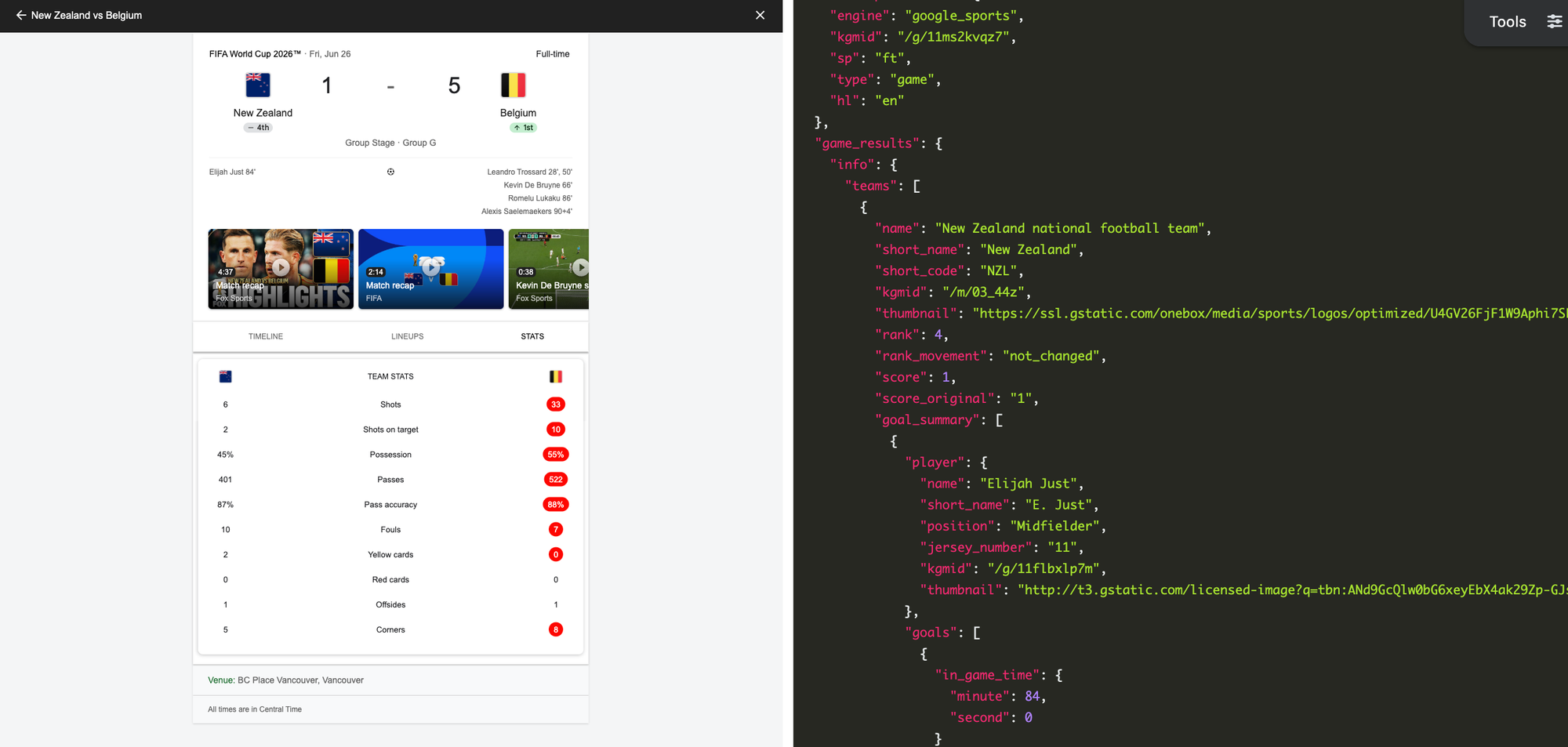
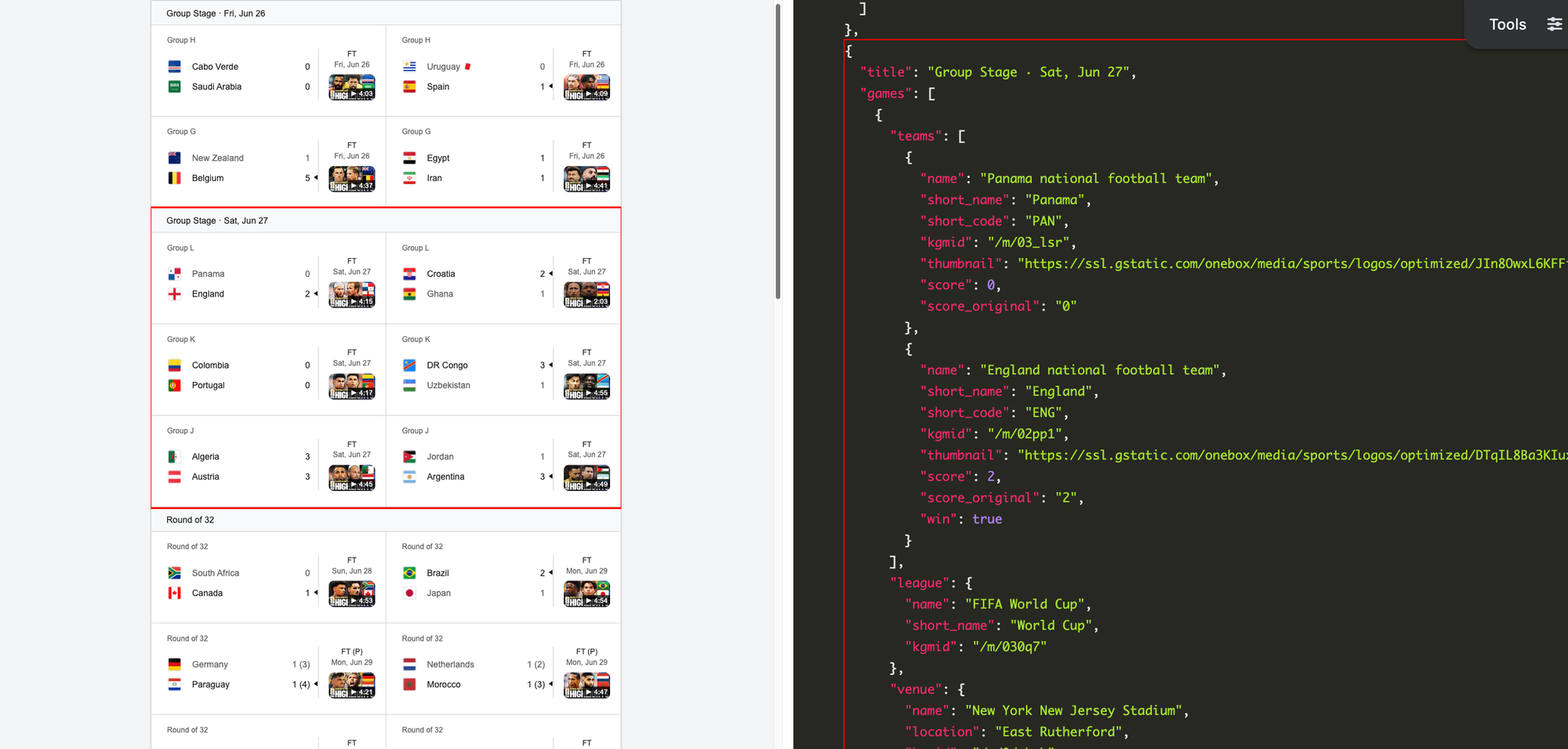
You can also pull information for sports tournaments or leagues using SerpApi, which can include this data:
- Title: The title of the tournament or league, such as "FIFA World Cup 2026."
- Games: A list of games in the tournament or league, with each game containing the teams, score, start and end time, stadium, highlights, and other information.
- Highlighted game: The current recommended game from Google, like an ongoing match or the next game, with information about the teams and location.
- Groups: The groups or rounds of the tournament, like "Quarter-finals" or "Round of 16."
- Standings: The team's standings in any available leagues or tournaments.
- Players: A list of players in the team, with full names, positions/roles, a link to their page on Google, and thumbnail images. The
kgmidknowledge graph ID is also available for each player, to fetch additional information about them.
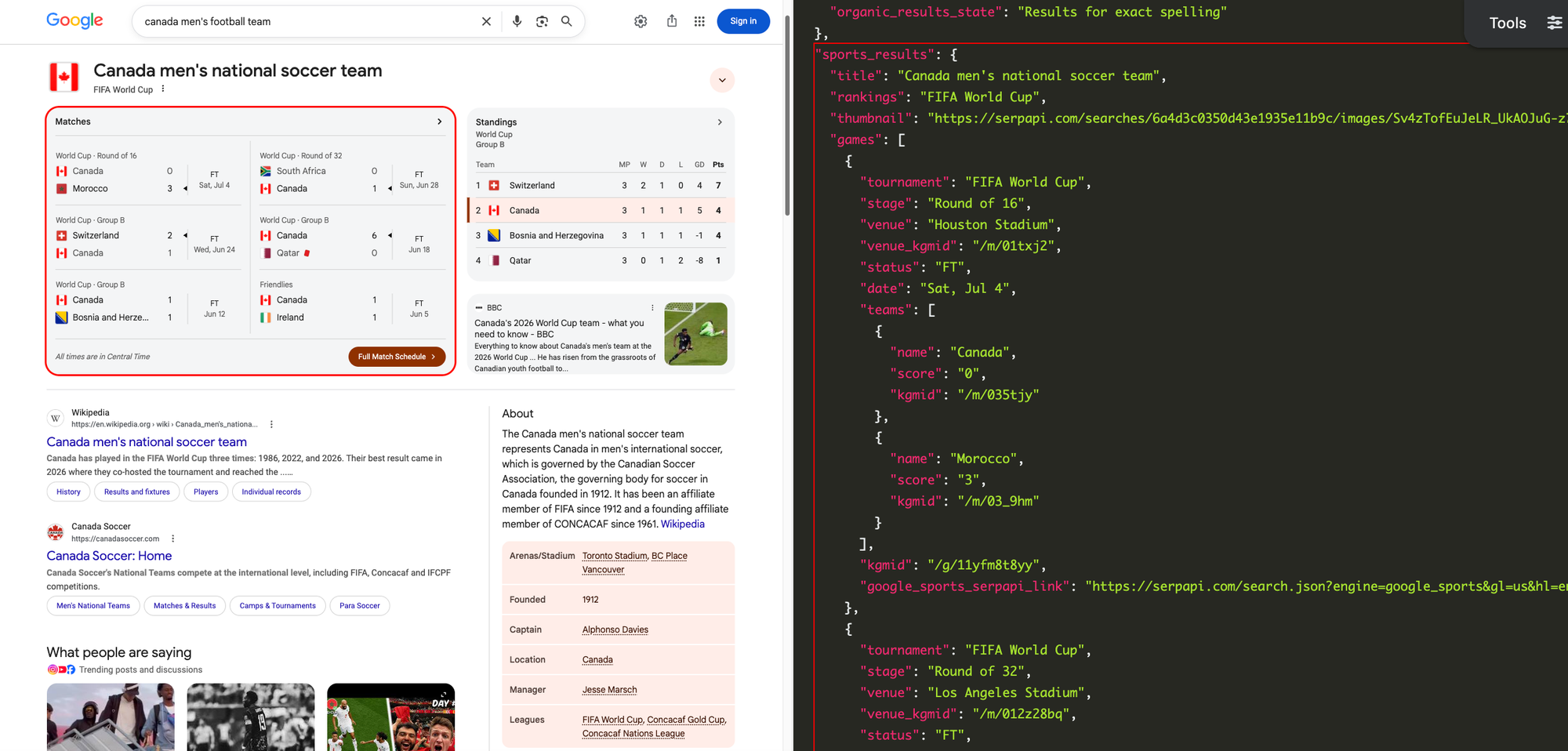
Google can provide results for a sports team, which SerpApi also extracts:
- Title: The name of the team, like "Canada men's national soccer team."
- Thumbnail: The thumbnail image for the team, such as the nation's flag.
- Games: A list of the team's recent games, with each one including a score, teams, tournament, and other information.
- Standings: The team's current standings in an ongoing or recent tournament.
The documentation for the Google Sports Results API contains more examples of search results with their structured JSON. For more complete use cases, check out our blog post on monitoring World Cup scores with SerpApi.
Getting started with SerpApi
Before getting started with the Google Sports Results API, you need a free SerpApi account. That also includes access to other engines, like the Google Search API, DuckDuckGo Search API, and Yahoo Search API. You can upgrade to a paid account later if you need more search capacity, faster speeds, or other features.
First, you need to create an account and verify your email and other details. After that, get the API key from your account dashboard.
Make sure to store your API key in a safe location if you are sharing or publishing your code. If the key is leaked or stolen, you can make a new one from the SerpApi account dashboard.
Install the SerpApi library (optional)
You can use SerpApi's official libraries for Python, JavaScript, Ruby, Java, and other languages. They provide a simple wrapper around the API requests.
However, the libraries are not required. You can still make API calls with cURL, fetch() in Node.js, or anything else that can send GET requests and process a JSON response.
Review the Google Sports Results API documentation
All the APIs at SerpApi have extensive documentation that covers all the supported parameters and filters, code examples for popular languages, and example JSON responses. This post covers some of the basic usage for parsing Google sports results, and you can find everything else at the documentation page.
 SerpApi
Some sports data can be accessed through requests to the Google Search API, using the q parameter for your query (like "super bowl lx" or "mexico football team"). Some details, like the tournament or stadium, will include a Google Knowledge Graph ID (kgmid) that you can search with the Google Sports API for additional information.
You can also find the Google Knowledge Graph ID with a few other methods, like a query to Wikidata or manual extraction from Google search results.
How to scrape Google sports results
If you have your API key, you're ready to start pulling data from Google sports results. The results will be identical across all libraries and GET requests, so use whichever method you want.
GET request
This performs a Google search for "Canada men's football team" from the US with a simple GET request, which includes a sports_results object in the JSON response:
https://serpapi.com/search.json?engine=google&q=canada+men%27s+football+team&gl=us&hl=en&api_key=YOUR_KEY_GOES_HEREThat sports_results object contains a kgmid key for one of the games, with a value of /g/11yfm8t8yy. You can use search that with the Google Sports API to get full details for the game:
https://serpapi.com/search.json?engine=google_sports&gl=us&hl=en&kgmid=%2Fg%2F11yfm8t8yy&sp=ft&type=game&api_key=YOUR_KEY_GOES_HEREThat API request can be created manually, with the kgmid parameter set to the provided value, type set to game, and sp set to ft for football. You can also use the pre-made request provided in the google_sports_serpapi_link key.
You can also use SerpApi's JSON Restrictor feature to trim the API response to specific values. This is the same search, but only returning sports data, excluding the organic search results and other information from Google:
https://serpapi.com/search.json?engine=google&q=canada+men%27s+football+team&gl=us&json_restrictor=sports_results&api_key=YOUR_KEY_GOES_HEREThis can be useful if you need more efficient parsing, like when using an LLM with a limited context window.
Python
This uses the official SerpApi Python library to search for the Mexican men's football team, and if a recent game is listed, the full lineup is displayed for both teams in the game:
import serpapi
client = serpapi.Client(api_key=YOUR_KEY_GOES_HERE)

# Start initial search

firstResponse = client.search({
  "engine": "google",
  "q": "mexico men's football team",
  "gl": "us",
  "hl": "en"
})
firstGame = firstResponse.get("sports_results", {}).get("games", [None])[0]
if firstGame:
  print(f"Found game at {firstGame['venue']} on {firstGame['date']}")

# Get more details if an ID is present

if "kgmid" in firstGame:
  secondResponse = client.search({
    "engine": "google_sports",
    "kgmid": firstGame["kgmid"],
    "gl": "us",
    "hl": "en",
    "type": "game",
    "sp": "ft" # ft for Football
  })
  if secondResponse.get("game_results", {}).get("lineups", [None]):
    for team in secondResponse["game_results"]["lineups"]["teams"]:
      print(f"\nTeam #{team["team_index"] + 1}:")
      for player in team["starters"]:
        print(f"{player["name"]} ({player["jersey_number"]})")
Ruby
This searches for a baseball game on Google and retrieves the game's ID, then performs another search with that ID, using the SerpApi Ruby gem. Finally, the data for all innings from the second search is displayed:
require "serpapi"

# Start initial search
first_req = SerpApi::Client.new(
  engine: "google",
  q: "blue jays mariners game",
  gl: "us",
  hl: "en",
  api_key: YOUR_KEY_GOES_HERE
)

# Find the game ID and search it for more information
game_id = first_req.search.dig(:sports_results, :game_spotlight, :kgmid)
if game_id
  second_req = SerpApi::Client.new(
    engine: "google_sports",
    hl: "en",
    kgmid: game_id,
    sp: "bb",
    type: "game",
    api_key: YOUR_KEY_GOES_HERE
  )
  # Get the list of teams
  game_teams = second_req.search.dig(:game_results, :info, :teams)
  # Display the innings for each team
  for team in game_teams do
    puts "\n#{team[:name]} - Total score: #{team[:score]}\n====="
    for inning in team.dig(:linescore) do
      puts "#{inning[:title]}: #{inning[:score]}"
    end
  end
end
JavaScript and Node.js
Here's how you can use the SerpApi JavaScript library to search for a football team, and if there is a recent (or ongoing) game, use that game's ID to show all statistics:
import { getJson } from 'serpapi';

// Start initial search and get game ID
const firstSearch = await getJson({
  engine: "google",
  q: "US women's football team",
  gl: "us",
  hl: "en",
  api_key: YOUR_KEY_GOES_HERE
});
const gameID = firstSearch?.sports_results?.games?.[0]?.kgmid;

// Start second search to get more details
if (gameID) {
  const secondSearch = await getJson({
    engine: "google_sports",
    kgmid: gameID,
    gl: "us",
    hl: "en",
    sp: "ft", // Football
    type: "game",
    api_key: YOUR_KEY_GOES_HERE
  });
  const teams = secondSearch?.game_results?.info?.teams;
  for (const i in teams) {
    console.log(`\n${teams[i].name} - Score ${teams[i].score}\n=====`);
    // Print all available stats for each team
    const stats = secondSearch?.game_results?.team_stats?.teams?.[i]?.stats;
    for (const a in stats) {
      console.log(`${stats[a].title} - ${stats[a].value}`);
    }
  }
}
cURL
Here's how you can retrieve details about a football game, like per-team statistics and highlights, using a cURL request:
curl --get https://serpapi.com/search \
 -d api_key="YOUR_KEY_GOES_HERE" \
 -d engine="google_sports" \
 -d hl="en" \
 -d kgmid="/g/11n3xxgprk" \
 -d sp="ft" \
 -d type="game"
Other languages and no-code solutions
You can still use the API directly with GET requests, even if there isn't an official SerpApi integration for your preferred environment or language. SerpApi also works with Make.com, N8N, and other tools.
Conclusion
Google Search has access to a wide range of past and live sports data, across football, cricket, ice hockey, American football, and other sports. With the Google Search API and Google Sports Results API from SerpApi, you can pull all those results into any automation or programming language.
If you need help using SerpApi, please contact us.