






 Ruby
 Golang
 .NET
 MCP
 C++

The Meta Ad Library, which many people still call the Facebook Ad Library, contains lists of the ads that run across Meta's technologies, including Facebook, Instagram, Messenger, WhatsApp, Threads, and the Audience Network. It shows what a brand is advertising right now, how long each ad has run, and where it appears. Marketers use it to research competitors, but browsing it by hand gets slow once you track more than a few advertisers.
SerpApi's Meta Ad Library API returns those ads as structured JSON and Markdown. You can use it to:
- Follow a competitor's ads: List the ads an advertiser is running, with their text, call to action, and landing page.
- Research creative across a topic: Search ads by keyword to compare messaging, formats, and offers from many advertisers.
- Track when campaigns start and stop: Check each ad's start date, end date, and active status over time.
In this tutorial, you'll try the API in the playground, then make your first request with cURL, Python, and JavaScript. After that, you'll page through results and filter ads by advertiser, country, and status.
What data can you retrieve with the Meta Ad Library API?
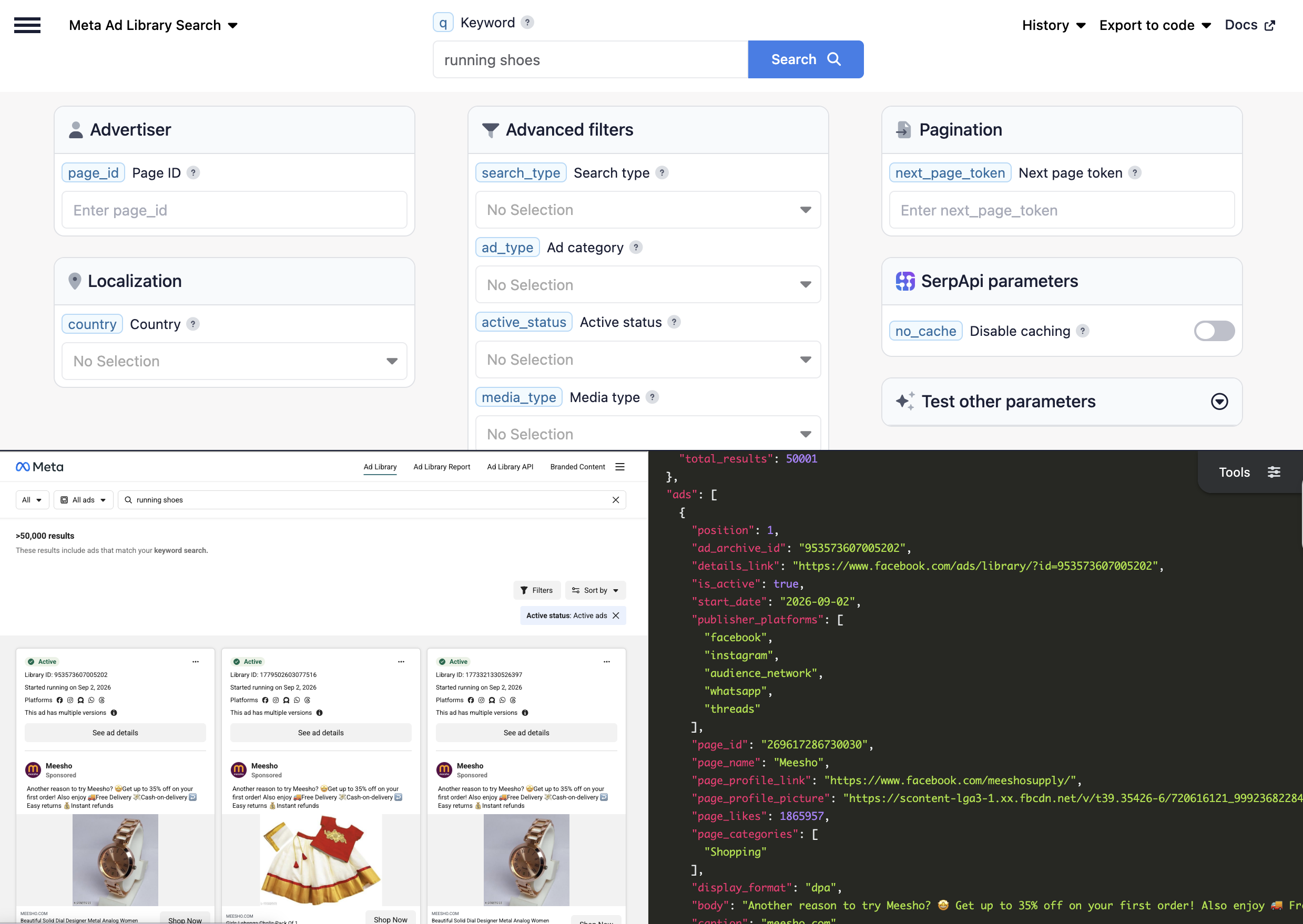
Each response has an ads array with up to 30 ads per page. When you search by advertiser, the response also has an advertiser block with the page's name and link.
- Ad identity and status: The ad's Library ID (
ad_archive_id), whether it's still running (is_active, which only appears on active ads), and a link to the ad in the Ad Library (details_link). - Dates and placements: When the ad started (
start_date), when it stopped (end_date, for inactive ads only), and the platforms it ran on (publisher_platforms). - Advertiser: The Facebook page behind the ad (
page_nameandpage_id) and its like count (page_likes). - Ad content: The ad text (
body), the landing page (link), and the button text (call_to_action). Carousel cards and dynamic ad versions are incards, and media links are inimagesandvideos. - Search totals: The number of ads found for your search is in
search_information.total_results. - Transparency data: Ads about social issues, elections, or politics also include
spend,impressions, and who paid for them (paid_for_by).
Image and video links point to Facebook's CDN and expire after a few days. See the Meta Ad Library API documentation for every field and parameter.
How to use the Meta Ad Library API
Try it in the playground
The fastest way to see the API's output is the SerpApi Playground. This link opens the meta_ad_library engine with the search query running shoes.
Run the search and look at the ads array. Check page_name to see who's advertising, start_date to see how long each ad has run, and cards to see the products in a carousel ad. By default, the API returns active ads of all categories from all countries.
We'll use the same running shoes search in every example below.
Get your API key
Create a SerpApi account, then copy your private API key from your account dashboard. Set it as an environment variable so your code can read it:
export SERPAPI_API_KEY="YOUR_SERPAPI_API_KEY"
Replace YOUR_SERPAPI_API_KEY with your own key on your machine. Keep it private, and don't commit it to a repository.
Make a GET request
The Meta Ad Library API needs engine=meta_ad_library and either a keyword (q) or an advertiser (page_id). The response is JSON by default:
https://serpapi.com/search?engine=meta_ad_library&q=running+shoes&api_key=YOUR_SERPAPI_API_KEY
To get Markdown instead, add output=md:
https://serpapi.com/search?engine=meta_ad_library&q=running+shoes&output=md&api_key=YOUR_SERPAPI_API_KEY
Markdown works well when you pass results to an LLM or AI agent, because it's compact and easy to read. Use JSON when your code needs exact fields, such as an ad's start date or landing page. Read more in the Markdown output documentation.
cURL implementation
Here's the same request with cURL. It reads your key from the environment variable you set earlier:
curl --get https://serpapi.com/search \
 -d engine="meta_ad_library" \
 -d q="running shoes" \
-d api_key="SERPAPI_API_KEY"engine=meta_ad_libraryselects the Meta Ad Library API.qis the keyword to search ads for. It matches ads from any advertiser.api_keyauthenticates the request.
Python implementation
Install the official SerpApi Python library:
pip install serpapi
Create a file named main.py:
import os
import sys

import serpapi

client = serpapi.Client(api_key=os.environ["SERPAPI_API_KEY"])

results = client.search({
    "engine": "meta_ad_library",
    "q": "running shoes",
})

if "error" in results:
    sys.exit(f"Meta Ad Library API: {results['error']}")

total = results.get("search_information", {}).get("total_results")
print(f"Ads found: {total}")
print()

for ad in results.get("ads", []):
    print(f"{ad.get('position')}. {ad.get('page_name')} | started {ad.get('start_date')}")
    print(f"   {ad.get('details_link')}")
Run it:
python main.py
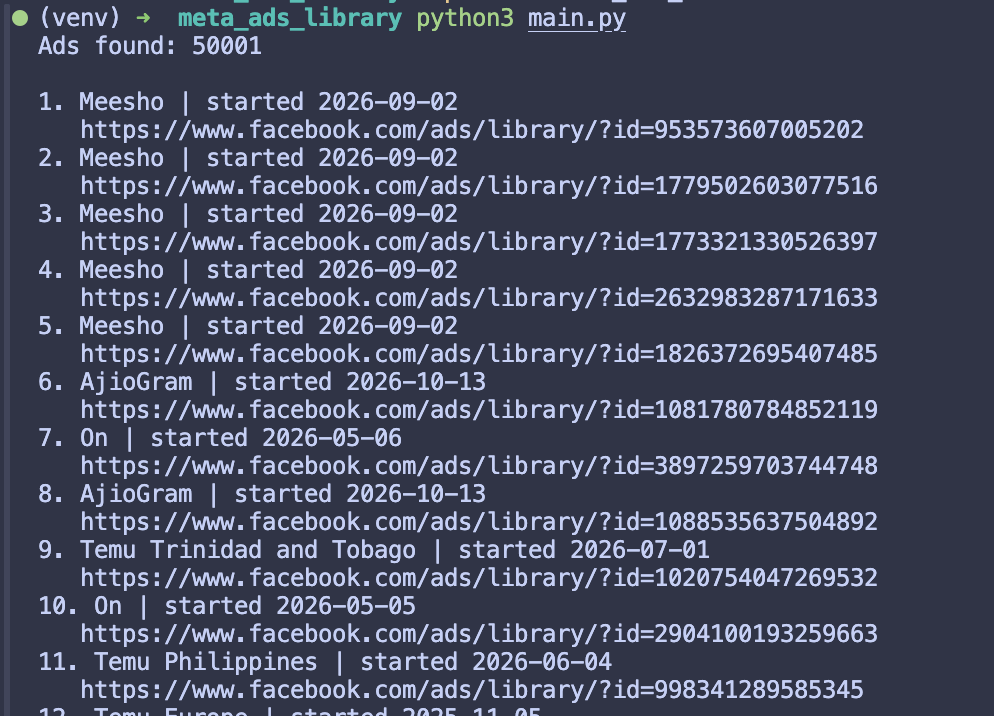
The script prints how many ads match running shoes, then each ad's position, advertiser name, start date, and link to the ad in the Ad Library.
If the request fails, the library raises an exception. If the search runs but can't return ads, the response contains an error message, and the script prints it and stops. Some fields only appear for certain ads, such as end_date for ads that stopped running, so the script reads them with .get().
running shoes in Meta Ad Library APIExport results to CSV
Each ad is a repeated record, so the results fit neatly into a spreadsheet. Add import csv at the top of main.py, then add this to the end. It reuses the results variable from the request above:
with open("meta_ads.csv", "w", newline="", encoding="utf-8") as file:
    writer = csv.writer(file)
    writer.writerow(["ad_archive_id", "page_name", "start_date", "is_active", "publisher_platforms", "call_to_action", "link", "details_link"])

    for ad in results.get("ads", []):
        writer.writerow([
            ad.get("ad_archive_id"),
            ad.get("page_name"),
            ad.get("start_date"),
            ad.get("is_active"),
            ", ".join(ad.get("publisher_platforms", [])),
            ad.get("call_to_action"),
            ad.get("link"),
            ad.get("details_link"),
        ])
publisher_platforms is a list, so the script joins it into one comma-separated cell. Nested data such as cards is left out to keep one row per ad.
JavaScript implementation
Install the official SerpApi JavaScript library:
npm install serpapi
Create a file named main.js:
async function main() {
  const { getJson } = await import("serpapi");

  const apiKey = process.env.SERPAPI_API_KEY;
  if (!apiKey) {
    throw new Error("Set the SERPAPI_API_KEY environment variable first.");
  }

  const results = await getJson({
    engine: "meta_ad_library",
    q: "running shoes",
    api_key: apiKey,
  });

  if (results.error) {
    throw new Error(`Meta Ad Library API: ${results.error}`);
  }

  console.log(`Ads found: ${results.search_information?.total_results}`);
  console.log();

  for (const ad of results.ads ?? []) {
    console.log(`${ad.position}. ${ad.page_name} | started ${ad.start_date}`);
    console.log(`   ${ad.details_link}`);
  }
}

main().catch((error) => {
  console.error(error.message);
  process.exitCode = 1;
});
Run it:
node main.js
You'll see the same output as the Python example.
Other languages and no-code options
SerpApi has libraries for other languages, too. See the full list on the integrations page.
If you'd rather not write code:
- Make: Use SerpApi's Make app. If the app has no dedicated module for the Meta Ad Library API, use the Universal "Make an API Call" module and add
engine=meta_ad_libraryand your other parameters yourself. Note that pagination isn't automated in the Universal module. - n8n: Use SerpApi's verified n8n node. It includes over 20 of SerpApi's most popular APIs. For an API that isn't in the node, use n8n's HTTP Request node with your SerpApi credentials.
How to paginate the results
Each page has up to 30 ads. To get the next ones, use the next_page_token parameter:
- The response includes
serpapi_pagination.next_page_tokenwhen more ads are available. - Send that token as
next_page_tokenin your next request, along with the sameqand filters. serpapi_pagination.nextalso gives you the full SerpApi link to the next page.
This example fetches up to three pages and stops early when there's no next page. Replace the search and print code in main.py with:
params = {
    "engine": "meta_ad_library",
    "q": "running shoes",
}

for page in range(3):
    results = client.search(params)

    if "error" in results:
        sys.exit(f"Meta Ad Library API: {results['error']}")

    print(f"Page {page + 1}")
    for ad in results.get("ads", []):
        print(f"  {ad.get('page_name')} | started {ad.get('start_date')}")

    next_page_token = results.get("serpapi_pagination", {}).get("next_page_token")
    if not next_page_token:
        break

    params["next_page_token"] = next_page_token
Each page is a separate search and uses a search credit, so keep the page limit small while you test.
Customize or filter the results
The API supports the same filters as the Ad Library. Here are three useful ones:
page_id: Gets the ads of one advertiser, using the ID of its Facebook page. You can find it inpage_idon any ad in your results. Nike's is15087023444. Combine it withqto get only that advertiser's ads that match the keyword.country: Limits results to ads shown in one country, as a two-letter code such asUSorDE. The default isALL.active_status: Chooseactive(the default),inactive, orall. Inactive ads include anend_date.
This example gets all of Nike's ads shown in the United States, including ones that stopped running. It reuses the client from main.py:
results = client.search({
    "engine": "meta_ad_library",
    "page_id": "15087023444",
    "country": "US",
    "active_status": "all",
})

if "error" in results:
    sys.exit(f"Meta Ad Library API: {results['error']}")

print(f"Advertiser: {results.get('advertiser', {}).get('name')}")

for ad in results.get("ads", []):
    status = "active" if ad.get("is_active") else f"ended {ad.get('end_date')}"
    print(f"{ad.get('start_date')} | {status} | {ad.get('details_link')}")
You can narrow results further with media_type (for example, video), publisher_platforms (for example, instagram), content_languages, a date range with start_date and end_date, and sort_by. The documentation lists every option.
Conclusion
You can now search the Meta Ad Library by keyword or advertiser, read each ad's text, dates, platforms, and links, page through results, and filter by country and status. You've done it with cURL, Python, and JavaScript, and you can export the results to CSV.
- To track the same competitors' search ads, see how to scrape competitors' Google Ads data.
- For other Facebook data, see how to scrape Facebook Marketplace listings.
Test it our for free in our playground, switch q to a brand or topic you want to track, and try a few filters.
Frequently asked questions
Do I need a keyword to use the Meta Ad Library API?
No. Set either q (a keyword) or page_id (an advertiser). You can also set both to get only an advertiser's ads that match the keyword.
How do I find an advertiser's page ID?
Search by keyword first. Every ad in the results includes the advertiser's page_id, which you can then pass as the page_id parameter.
How many ads does one request return?
Up to 30 ads per page. Use next_page_token from serpapi_pagination to get the next page. search_information.total_results tells you how many ads were found in total, up to 50,001, which means more than 50,000.
Can I get ads that are no longer running?
Yes. Set active_status to inactive for stopped ads only, or all for both. Inactive ads include an end_date.
How long do the image and video links work?
The links point to Facebook's CDN and expire after a few days. Run the search again when you need fresh links.